A Comprehensive Integration Guide

In the dynamic sphere of artificial intelligence, the fusion of Generative Pre-trained Transformers (GPT) with automation tools heralds a new era of innovation. Zapier, a leading automation platform, offers a bridge to enhance the capabilities of custom GPTs, enabling them to perform an array of automated tasks. This integration not only amplifies the utility of GPTs but also redefines their role as multifaceted AI agents. This blog post unfolds the nuanced process of integrating Zapier actions into custom GPTs, detailing a revised and comprehensive approach that includes the correct implementation of action names and confirmation links.
The Advent of Automated Custom GPTs
The exploration into augmenting custom GPTs with automation has led to a pivotal discovery: the integration of Zapier actions. Zapier facilitates the automation of workflows by connecting different apps and services, thereby extending the functional scope of GPTs beyond traditional text generation. With this integration, custom GPTs are empowered to execute tasks such as sending emails, managing files, and automating notifications, effectively acting as dynamic AI agents tailored to both personal and business needs.
A Step-by-Step Guide to Integrating Zapier Actions into Custom GPTs
The integration of Zapier actions into custom GPTs is a transformative process that unlocks new potential. Here is a detailed guide on how to achieve this integration effectively.
Step 1: Identify Automation Objectives
Begin by pinpointing the specific tasks you wish to automate through your custom GPT. This could range from administrative duties like scheduling and email management to more complex workflows involving data management and communication.
Step 2: Create a Zapier Account
If you haven’t already, sign up for Zapier. This platform will serve as the command center for automating tasks between your custom GPT and other applications.
Step 3: Link Zapier with Your Custom GPT
Visit the dedicated Zapier GPT Integration page to access the necessary code or API guidelines for connecting Zapier with your GPT. Implement this code as a function within your custom GPT, either in the GPT builder or through a scripting interface, to establish a direct link between your GPT model and Zapier.
Step 4: Craft Custom Actions on Zapier
Head over to https://actions.zapier.com/gpt/actions to create actions tailored to your automation needs. Whether it’s automating emails, database entries, or social media posts, this step involves setting up the specific tasks you want your GPT to trigger through Zapier.

Step 5: Embed Action Names and Confirmation Links in GPT Instructions
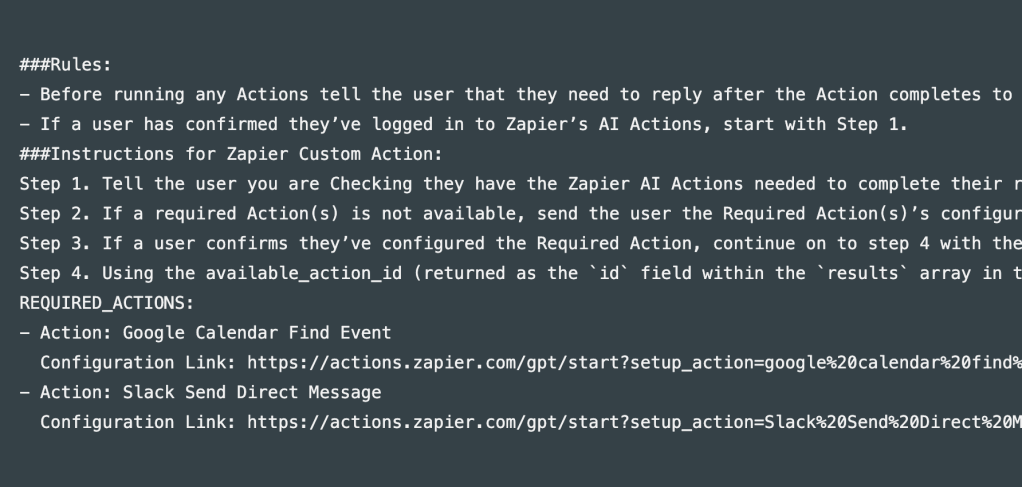
After setting up your actions, you will need to incorporate the Action Name and Confirmation Link into the instructions you provide to your GPT. The Confirmation Link is crucial for integrating the action and must be copied from the browser URL when you open your Zapier action. This step is vital for instructing your GPT on when and how to trigger the specific Zapier actions you’ve configured, seamlessly linking the automated tasks to your GPT’s operations.
Step 6: Test and Deploy Your Integration
With the integration complete, it’s essential to test the functionality to ensure that your custom GPT triggers Zapier actions as expected. Conduct several test runs to verify the setup’s efficacy. Upon successful testing, your integration is ready to be deployed, marking the beginning of a new phase of enhanced productivity and efficiency for your custom GPT.
Conclusion: Elevating AI with Zapier Integration
The strategic integration of Zapier actions into custom GPTs signifies a leap forward in the utility and versatility of AI models. This innovative approach not only broadens the capabilities of GPTs but also introduces a level of automation that can significantly impact both personal and professional environments. By following the steps outlined in this guide, you can transform your custom GPT into a highly adaptive AI agent, capable of executing a wide range of tasks autonomously. Embrace this integration to explore the full potential of your AI applications, setting new benchmarks for what is achievable in the realm of artificial intelligence.
 Nakya - Design, Tech & More
Lascia un commento